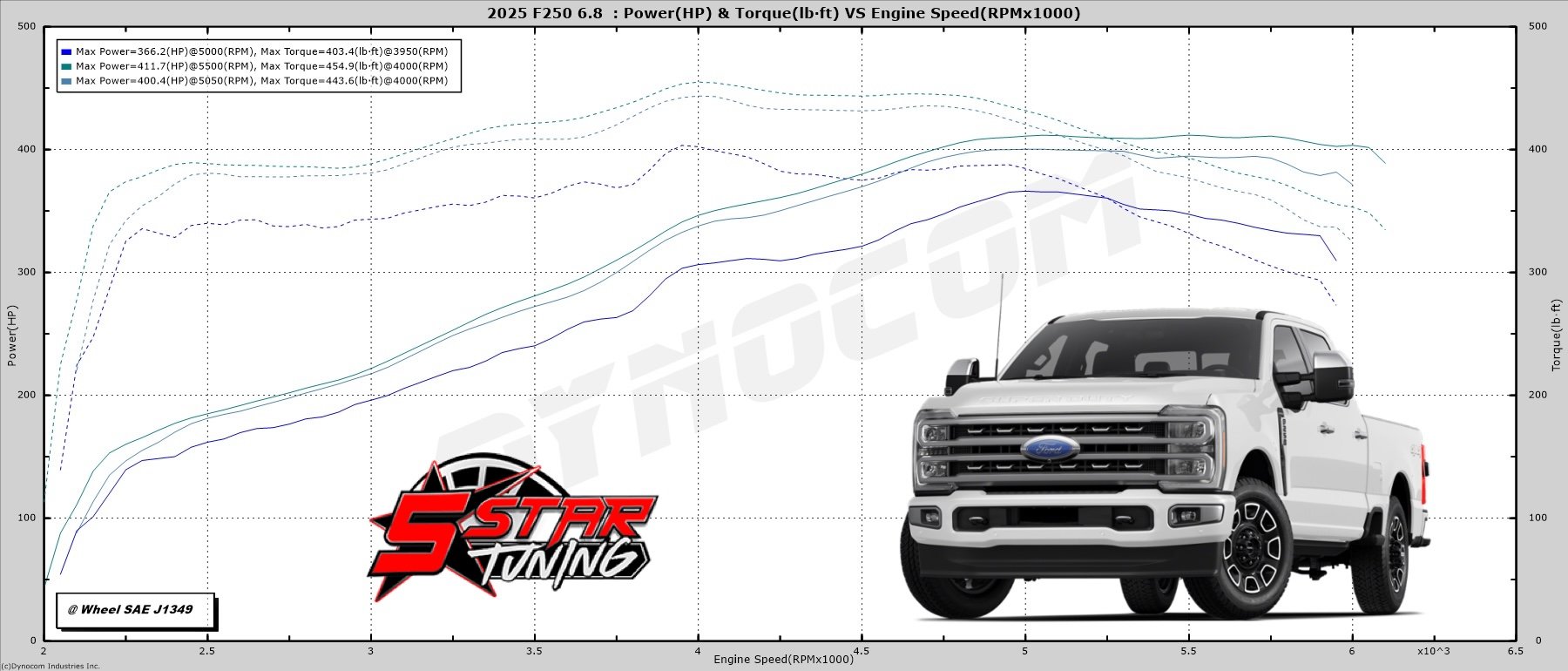
DYNO & STREET PROVEN
LETS PROVE IT
INCREASED HP & TORQUE
Optimized Fuel Efficiency
BETTER THROTTLE RESPONSE
TUNERS WITH CUSTOM TUNES

2023-2025 SUPER DUTY 6.8L HP TUNERS RTD+ WITH CHOICE OF 5 STAR CUSTOM TUNES

$799.95

The HP Tuners RTD+ offers 5 Star tuning and custom truck tunes for Ford vehicles, with real-time diagnostics through the TDN app—no laptop required.

Ready to unlock your engine? Get started by selecting an option below

Choose the number of custom tunes for your tuner. Three custom tunes are INCLUDED, specifically tuned for your setup.

Have aftermarket upgrades? Select all applicable upgrades to customize your tunes accordingly. Stock? Skip me.

Select your fuel type for custom tunes. Pick the highest-grade fuel you’ll use to get the best performance.

Questions? Contact our Tuners
Full Installation Guide. Learn more
GAURANTEED SECURE PAYMENTS
SKU: 5STRTD4(2023-2025 Super Duty 6.8L) Categories: , Tags: , , , , ,

AREAS WE ADDRESS

DYNO RESULTS
Embed HTML not available.
STEP-BY-STEP

TUNER & TUNES PROCESS

Calibration forms Tuner/Tunes installation guide
WHY CHOOSE

5 STAR TUNING

Let our valuable customers do the talking..

Frequently asked questions

From the factory, your vehicle’s computer is calibrated for the masses, designed with the average driver in mind, not the performance enthusiast. This not only leaves valuable horsepower & torque hidden inside your vehicle, but it also makes for a mediocre driving experience. Our tuners unlock your vehicle’s hidden performance by re-calibrating your vehicle’s PCM for maximum horsepower & torque, increase throttle response, clean shift points, increased efficiency and the best driving experience possible.

Our tunes bring the most potential out of your vehicle by adjusting your fuel tables, drive by wire, timing, torque converter, shift strategies and shift pressures. Visit our Custom Tuning Info section for more detailed information for your specific vehicle.

Our entire lineup of tunes for your vehicle can be found by visiting our calibration request form. All of our current tunes for each application can be found under our custom tune dropdown menu.

We are your industry leader in Ford and GM truck, car, SUV and motorhome tuning. We create and offer the most refined tunes on the market for your application. Rather than offering you a one-sized fits all approach we custom tailor all your tunes to your specific needs. These needs can be more power, more torque, tuning for your current or future modifications or simply getting the best driving experience from your vehicle. In addition to our refined approach to tuning vehicle, we ensure your vehicles reliability will never be compromised.

For starters, this device is extremely versatile. In addition to being a flash programmer it can perform many other functions. It can easily load store up to 10 of your 5 Star Tuning custom tunes. Your device can also be used to monitor your vehicle engine parameters. (Parameters can range from engine RPM, Speed, Coolant Temperatures and many more). The tuner can also be used to datalog your vehicle to further dial in current or future modifications. This flash programmer will also store a copy of your factory tune and your vehicle can be returned to stock at anytime.

Have you added a new mod to your truck, car, SUV or motorhome and wish to maximize your application’s performance? For all our Tunes for Life members, these modifications are free for the life of your vehicle while you own it. This will ensure that your vehicle run properly with our dyno and street tested tunes give you the most horsepower, torque, and most efficient performance possible with your newest addition. For more information on what qualifies for free tune upgrades visit https://5startuning.com/free-tunes-life/.

Unlock the Full Potential of Your Ford with the HP Tuners RTD+

Looking for a seamless, cable-free way to tune your Ford? The HP Tuners RTD+ (Remote Tuning Device) is the ultimate solution for performance enthusiasts who want power and precision without bulky tuning devices or cumbersome cables. Built on the foundation of HP Tuners’ highly acclaimed MPVI2, the RTD+ plugs directly into your vehicle’s OBDII port, enabling fast and efficient tuning through HP Tuners’ TDN (Tune Delivery Network)—all from your iOS or Android smartphone. No laptop required!

Key Features & Benefits

✔ Seamless Smartphone Tuning – Load tunes, send your stock file to your tuner, and install updates effortlessly using the HP Tuners TDN app on iOS or Android.
✔ Full HP Tuners Compatibility – Works flawlessly with VCM Scanner and the Pro Feature Set for advanced tuning capabilities.
✔ No Laptop Needed for Tuning – Read and clear Diagnostic Trouble Codes (DTCs), install custom tunes, and monitor performance—all from your phone.
✔ Real-Time Datalogging – Track and log critical performance data without a laptop, ensuring optimal tuning adjustments.
✔ Speedometer Calibration – Adjust for tire size, wheel upgrades, and axle/gear ratio changes (laptop required for calibration).
✔ Compact & Powerful Design – Small, portable, and efficient—designed to integrate seamlessly into your performance setup.
✔ Supports Multiple Vehicles – The RTD+ can be used to tune any vehicle supported by HP Tuners software, making it a versatile tool for performance tuning.

Important Note: The RTD+ does not support VCM Editor but fully integrates with VCM Scanner and the Pro Feature Set.

Why Choose the HP Tuners RTD+?

If you’re looking for a high-performance, wireless tuning solution that delivers power, precision, and ease of use, the HP Tuners RTD+ is the perfect tool for you. Say goodbye to outdated tuning cables and hello to cutting-edge mobile tuning technology.

Upgrade your tuning experience today with the HP Tuners RTD+ and take control of your vehicle’s performance—anytime, anywhere!

Weight 2 lbs
Dimensions 9 × 8 × 2 in
brand

Reviews

There are no reviews yet

Add a review
Currently, we are not accepting new reviews

Step 1: Ordering Your Tuner
– Select the tuner that best fits your needs and place your order online or via phone.
– If your ECU strategy code matches Ford’s most current calibration, we will tune your vehicle based on your submitted information.
– If your ECU strategy is outdated, a blank device will be sent to you.

Step 2: Retrieving Your ECU Strategy Code
– Upon receiving your blank tuner, connect it to your vehicle’s OBD-II port.
– Turn off all accessories such as the radio, heat, and A/C.
– Select Vehicle Info on your device:
X4 and BDX: Press the center button.
LiveWire, iTSX, and GTX: Press Select on the screen.

Step 3: Recording Your ECU Strategy Code
– Write down your ECU Strategy Code or ECU SWPN Part Number based on your vehicle:
1996–2014 vehicles: Strategy code is listed under ECU Strategy.
2015+ vehicles: Both ECU Strategy and ECU SWPN are required.
2011+ 6.7L Ford Diesel applications: Provide ECU Strategy, ECU SWPN, TCU Strategy, and TCU SWPN.
Other diesel applications: Provide ECU Strategy and TCU Strategy codes.

Step 4: Submitting Your Vehicle Information
– Select Exit and unplug your device.
– Email your strategy code(s) to [email protected] or submit them via our Calibration Request Form:
👉 https://5startuning.com/5-star-tuning-calibration-request/ (This is where you select your tunes)

Step 5: Downloading Your Custom Tunes
– Once your custom tunes are ready, we’ll email you a link to our Google Drive where you can download them:
.cef files for SCT/Bully Dog devices
.bct files for Bully Dog GT devices
– Need assistance? Visit our Support Page or call (843) 536-1244.

Step 6: Loading and Flashing Your Custom Tune
– Load the custom tunes onto your device.
– Plug the tuner back into your vehicle’s OBD-II port.
– Select Program Vehicle and choose the custom tune you want to install.
– Follow the on-screen prompts to complete the tuning process.

🚗 You’re all set! Your vehicle is now tuned with a 5 Star Custom Tune. 🚀

What Is the Process With PCM-F0-MG1-U?
HP Tuners is pleased to now offer an upgrade service for the MG1 PCM found in 2021-2022 Ford F-150 trucks powered by the 3.5L and 2.7L EcoBoost V6 or 5.0L V8 gas engine. This service enables full functionality of VCM Suite software custom tuning using an RTD+ or newer generation interface. This one-time upgrade service upgrades your original Ford MG1 PCM requiring you to remove the original PCM from your truck and send it to our headquarters for servicing (see shipping information below). After upgrading, we’ll ship it back to you and you’ll have full access to calibrate, log, and scan via the OBDII port using the latest version of VCM Suite.

No relearns/reprogramming required (see important notes):
No IMMO relearn*
No crank relearn*
*As long as the PCM is installed back into the same vehicle it came from.

Ford MG1 PCM Service:
PCM (Ford MG1) License for tuning: (4) Universal Credits (Included with the purchase of 5 Star Tuning RTD+ or 5 Star Tuning email tunes)

Important Notes:
This service is required to tune 2021-2022 F-150 trucks with the 3.5L EcoBoost/2.7L EcoBoost/5.0L gas engine and MG1CS036 PCM using VCM Editor.
This is a send-in upgrade service that requires the original PCM to be removed from the vehicle and sent to HP Tuners for servicing.
Expect 1-3 business days for servicing (not including shipping times).
PCMs with broken tabs or connectors WILL NOT be accepted for upgrades. No exceptions. Please be careful when removing your PCM.
This service only upgrades your original PCM for tuning, it does not reprogram your PCM for a different VIN. If you intend to send HP Tuners a spare PCM, it will be returned to you with the same programming as it was received and may not operate in your Ford vehicle without additional programming by a Ford dealer.
Your MG1 core must be fully functional with no physical or internal damage.
No other tuning or calibration tools can be used with the PCM (including dealer reflash tools).
VCM Scanner, Dealer Diagnostic, and other diagnostic tools will continue to function normally.

How It Works:
Step 1: Once you’ve confirmed your vehicle’s support (2021-2022 Ford F-150 3.5L EcoBoost/2.7L EcoBoost/5.0L with MG1CS036 PCM), purchase this service.
Step 2: After placing your order, you will receive an email with a shipping form and shipping information. You can also find this form and address here. Fill out this form with the necessary information.
Step 3: Carefully remove the PCM from your vehicle and securely package it to ship to HP Tuners. Place your completed shipping form in the box. Feel free to use any shipping carrier you prefer.
Step 4: Write your order number on the outside of the shipping box.
Step 5: Ship your PCM to HP Tuners. The shipping address can be found on this page and in the email discussed in Step 2. Shipping costs to and from HP Tuners are the responsibility of the customer. The shipping charge at checkout only covers return shipping.
Step 6: HP Tuners will upgrade your PCM for tuning. Then, we’ll ship it back to you (return shipping costs are paid by the customer at checkout). This service requires 1-3 business days to complete (excluding shipping times).
Step 7: Once you receive your upgraded PCM, install it back into your vehicle and start tuning! There are no relearns or reprogramming required as long as the PCM returns to the same vehicle it came from.

Shipping Address for PCM Upgrade:
HP Tuners, LLC
ATT: Ford MG1 PCM Service
[YOUR ORDER NUMBER]
700 Eastwood Ln
Buffalo Grove, IL 60089
Please allow for 1-3 business days for servicing (not including shipping times).
After purchasing this service, please fill out the shipping form and place it in your shipping box. Please also write your order number on the outside of your shipping box where it is visible.
PRINT SHIPPING FORM
  NOTE: Customers are responsible for shipping costs when sending HP Tuners your PCM/PCM/TCM. The shipping charge at checkout only covers returning your control module after modification. Feel free to use any shipping carrier you prefer to ship your controller to HP Tuners.
  NOTE: Any hardware ordered with this service will be shipping along with your modified PCM. To avoid delays, please order the hardware separately.
Disclaimers:
These PCM services are completed at the owner’s risk. HP Tuners will not be responsible for the vehicle, its powertrain, or electronics, nor how the PCM is used, calibrated, and its functionality.
Due to the factory location of the PCM in the vehicle, all PCMs will exhibit signs of weathering and wear, which is completely normal.
Should you experience any issues with your PCM, please submit a ticket to our support team for assistance on how to proceed.

*** NOTE: Wi-Fi is required to read and write to your vehicle. Ensure you have a strong Wi-Fi connection and your Windows laptop (required) battery is charged or that your laptop is currently charging.***

You will need RTD Flasher Softwarehttps://files.hptuners.com/RTD%20Flasher/RTD%20Flasher.msi

Step 1: Open RTD Flasher Software
1. After installing RTD Flasher, open the software on your computer.
2. Connect your RTD/RTD+ device to your vehicle’s OBD-II port.
3. Using the provided USB cable:
– Plug the USB-C (smaller side) into the RTD/RTD+ device.
– Plug the other end into a USB slot on your computer.
4. Turn your vehicle to the ON position (DO NOT START THE VEHICLE).
– For push-button start vehicles: Press the start button once WITHOUT pressing the brake pedal.

Step 2: Read Vehicle Information
1. In RTD Flasher, select the Read Vehicle option at the top.
Icon: 📖 (Book with a green arrow pointing up).
2. Click Gather Information.
3. Depending on your vehicle, you will see one of two options:
Vehicles with 1 Module (Controls both engine & transmission):
– Select Read Entire.
Vehicles with 2 Modules (Separate engine & transmission controllers):
– Select Read Entire for both modules.
Chevrolet Vehicles (3 Controllers):
– Select Read Entire for the top 2 controllers.
– Set the third controller to Do Not Read using the dropdown menu.
4. After confirming your selection, click Read to begin.
This process may take up to 20 minutes.
– A loading bar will display progress.
5. If prompted, cycle the key as instructed.
6. Once completed, save the stock file as:
FirstName LastName stockfile (e.g., JohnDoe_StockFile).
– Save it somewhere easy to find, like your desktop.
7. Email your stock file to: 📩 [email protected], If you have not yet submitted your vehicle details and tune selection, complete the Calibration Request Form 👉 https://5startuning.com/5-star-tuning-calibration-request/ (this is where you select your tunes). Call us at (843) 536-1244 if you have problems or visit our Support Page.

Step 3: Download & Load Custom Tunes
1. Once you receive your custom tunes via email, download and save them in an easy-to-find folder on your computer.
2. Open RTD Flasher and connect your RTD/RTD+ device to your OBD-II port and computer.
3. In RTD Flasher, go to:
Help Menu → Resync Interface
– This will add the necessary credits for licensing your vehicle.
– Once completed, click Close.

Step 4: Flash Your 5 Star Tune
1. Click the Open File option (Folder icon or go to File → Open File).
2. Select the tune file you want to use.
3. Turn the key to the ON position (DO NOT START THE VEHICLE).
4. Click the Write Icon (📖 Book with a red arrow pointing down).
5. A new window will appear to license your vehicle:
– Click Show License Option.
– Select Specific Controllers and click Commit to License.
6. In the Flashing Window:
– Ensure all dropdowns are set to Write Calibration.
– Click Write to begin flashing.
7. When prompted, cycle the key.
8. Once you see “Flash Completed”, your 5 Star custom tune is successfully installed! ✅

Step 1: Set Up Your Avid Tuner
Connect to Wi-Fi
– Power up your Avid Tuner via USB-C or by plugging it into your vehicle’s OBD-II port.
– Navigate to Wi-Fi Settings.
– Select your 2.4 GHz Wi-Fi network and enter the password.
– If using a mobile hotspot, enable Maximize Compatibility in your phone’s hotspot settings.
Update Your Avid Tuner
– To ensure your device has the latest features and compatibility updates:
– Navigate to Settings > Update.
– Follow the on-screen prompts to install updates.
– Keep the device powered and close to Wi-Fi for a smooth update process.

Step 2: Retrieve Your ECU Strategy Code
– Plug your Avid Tuner into your vehicle’s OBD-II port.
– Open the ARC Software on your PC (if using a computer).
– Select Read Vehicle Information to retrieve the ECU strategy code and any additional necessary data:
ECU Strategy (1996+ vehicles)
ECU SWPN (2015+ vehicles)
TCU Strategy & SWPN (2011+ 6.7L Ford Diesel)
– Save or write down these details.

Step 3: Submit Your ECU Information
Email your strategy code to [email protected] or submit it via our Calibration Request Form:
👉 https://5startuning.com/5-star-tuning-calibration-request/
After submission, our team will create a custom tune and send you a link to download it.

Step 5: Retrieve and Upload Your Custom Tune
Download Your Tune
– Once your custom tune is ready, you will receive a link to Google Drive to download the files.
– Save the tune file on your PC.
Sync Files to Your Avid Tuner
– Power on your Avid Tuner and connect it to Wi-Fi.
– Navigate to Sync in the menu.
– Locate your tune files and highlight each file individually.
– Once all desired files are selected, press Sync to transfer them to your device.
Manage Device Files
– Under the Manage tab, you can organize your saved files.
– Delete old or unnecessary files if needed.

Step 6: Flash Your Vehicle with 5 Star Custom Tunes
– With the Avid Tuner powered on and loaded with your custom tune, connect it to your vehicle’s OBD-II port.
– Open the ARC Software and select Flash Vehicle.
– Choose the custom tune you want to install and follow the on-screen instructions.
– Make sure your vehicle ignition is ON, but the engine is NOT running during flashing.
– Follow any key cycle instructions if prompted.

🚀 Your vehicle is now tuned with a 5 Star Custom Tune! 🚀

How Long Does Installation Take? The installation will take approximately 5-10 minutes for SCT, around 30 for HP.

Do I Need A Shop To Install? The installation process of the tuner is simple and can be performed by anyone. No tools are required for the installation.

What If I Have Other Technical Questions? We can always be reached at (843) 536-1244 or via email at [email protected] for questions on concerns on the tuning process. We also feature a support page with information and videos pertaining to loading your custom tunes, updating your device, installation, etc at https://5startuning.com/support/.

Note: SCT’s software is only compatible with Microsoft’s Windows operating systems. For OS other than Windows, we recommend the SCT/Bully Dog/5 Star Tuning The Bully Dog BDX will support custom tuning via Wi-Fi. *** FOR HP RTD TUNERS: Wi-Fi is required to read and write to your vehicle. Ensure you have a strong Wi-Fi connection and your Windows laptop (required) battery is charged or that your laptop is currently charging.

COMPLIANCE WARNING
By purchasing this tuner or performance modification, you acknowledge responsibility for ensuring compliance with all applicable laws and regulations and understand that 5 Star Tuning is not liable for any violations or emissions-related issues; this product is not legal for use in California.